
Surfline: Wave & Surf Reports
Surfline/Wavetrak, Inc.Weather
4.02.50K Reviews
- Version
- 12.8.3
- Installs
- 1.00M
- Age Rating
- Everyone
Screenshots
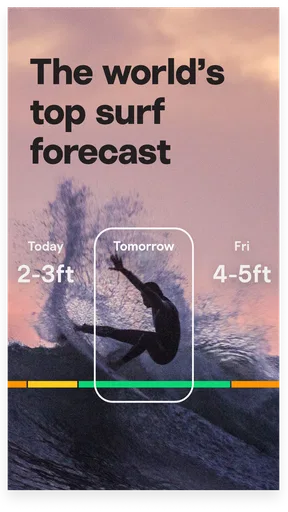
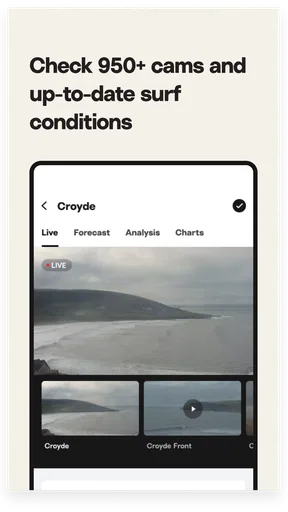
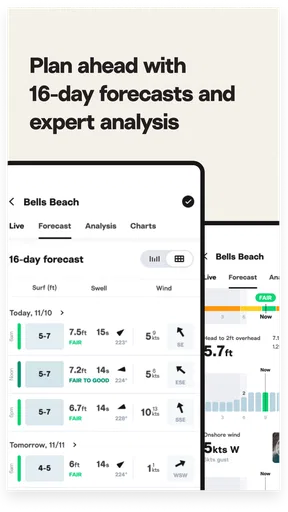
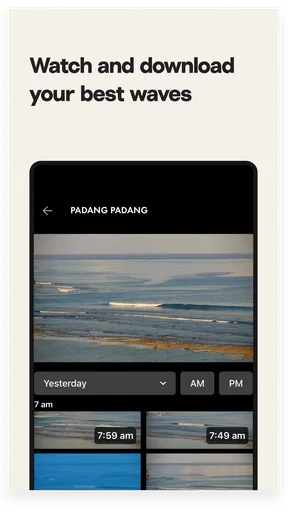
Our Review of Surfline: Wave & Surf Reports
 Analysis by Appyee
Picking a surf spot can turn into a surprisingly time-consuming loop: check the weather, search for a tide table, look for a recent beach view, then wonder whether all those details point to the same answer. I like that Surfline brings surf conditions, cameras, wind and tide information into one place, so I can make a quicker call before packing the car. It is most useful as a planning aid, not a promise that the ocean will behave exactly as forecast.
I’d recommend it first to surfers who regularly compare several breaks or need to fit a session around work, school or family plans. If you only want a general local weather forecast, a standard weather app is likely simpler. Surfline is a free weather app from Surfline/Wavetrak, Inc., rated for Everyone, with optional in-app purchases ranging from about one dollar to around one hundred fifty dollars per item. Its 4.2 average from around nine thousand ratings suggests a broadly positive reception, while the range of purchase options is a good reason to check what you actually need before paying for anything.
Start with a short list of spots
The best first step is not to browse every beach the app can show; it’s to save the handful you might genuinely visit. Once your regular spots are easy to find, forecasts and camera views become a practical comparison rather than a wandering tour of coastlines. I’d keep one reliable nearby option and one or two alternatives that work when wind or timing makes the first choice less appealing.
Surfline has been around since Aug 2, 2011, and version 11.1.2 supports devices running Android 8.0 or later. It has over a million installs, but those figures matter less to me than whether the app helps answer a specific question: is it worth leaving now, waiting a few hours, or choosing another break? Setting up a compact list of favorites makes that decision faster and cuts down on irrelevant checking.
Use the forecast and the camera together
A forecast gives me a useful overview, but I wouldn’t treat a single number as the whole story. Wave conditions, wind and tide are related pieces of the decision, and a camera can add visual context when one is available for the spot. My useful routine is to check the forecast first, then look at the beach view to see whether what I’m seeing broadly fits the plan. If the picture looks different from what I expected, I pause and reassess instead of assuming the forecast is wrong or the camera tells the whole story.
That combination is particularly handy when deciding between two nearby breaks. A quick camera check can help me avoid driving to a spot that looks uninviting, while the forecast helps me compare likely conditions rather than choosing based on appearance alone. It can also save an unnecessary trip when I’m still at home. Cameras and connection quality can vary, though, so I would not build a tight schedule around a live feed loading instantly every time.
What it changes in an ordinary week
On a busy weekday, I might have a narrow window before other plans. Instead of opening several unrelated apps and piecing together a guess, I can check my saved spots, compare the wind and tide information, and take a look at a camera before deciding whether the session is worth the effort. That does not remove the need to use judgment at the beach, but it makes the early planning less scattered.
The app is especially appealing if you enjoy following surf even when you cannot get in the water. Cameras can make distant breaks feel more immediate, while reports help give that view context. On the other hand, someone who rarely surfs may find that a general forecast app already handles their real need. Surfline earns its place when coastal conditions, rather than everyday rain or temperature, are the question you keep asking.
Your Personal Ocean Guide
The Surfline: Wave & Surf Reports app is essentially your personal ocean guide, offering a plethora of features that are bound to make any surfer’s heart flutter. Right off the bat, what caught my eye was the vast network of surf cams. We’re talking over 500 live streaming cameras from beaches all around the globe. Whether you're checking out the surf in Malibu or seeing what the swells are like in Bali, this app has got you covered.
Not only do you get real-time views, but the app also provides detailed surf reports. These reports are super comprehensive, offering information on wave height, wind speed, and even tide schedules. It’s like having a surf guru in your pocket, whispering all the secrets of the sea right into your ear.
Features That Make Waves
Let’s dive deeper into some of the standout features that make this app a must-have. First up, the Surfline Sessions feature is pretty neat. It allows you to link your phone with a compatible device, like a GoPro, and record your surf sessions. You can then review your rides, making it a fantastic tool for improving your technique or simply bragging to your buddies.
The app also offers personalized surf forecasts. After setting up your favorite spots, you get tailored notifications about the surf conditions. It’s a lifesaver, especially when you’re juggling a busy schedule and need to know the optimal time to hit the waves. And for those who like a bit of reading, there’s an array of articles and videos that cover everything from surfboard reviews to pro tips.
Riding the Digital Wave
Now, let’s talk about the user experience. The app’s interface is sleek and intuitive, which is a big plus for those of us who aren’t exactly tech wizards. Navigating through the features is smooth sailing, and the video quality of the live cams is top-notch, which is crucial when you’re trying to scrutinize those waves from afar.
One thing that stands out is the community feel within the app. You can connect with other surfers, share insights, and even get some friendly advice. It’s like having a virtual beach bonfire where everyone’s gathered to chat about their latest wave conquests.
Interpret the view rather than chasing a perfect score
A camera is most valuable when I use it to compare what a break looks like with what I already know about that spot. I look for broad clues—whether the water seems organized, whether conditions appear exposed to wind, and whether the scene seems busy—rather than trying to judge every wave from a screen. A camera view is a snapshot from one angle; it can help me rule out an obviously unsuitable plan, but it cannot replace local knowledge or a careful check once I arrive.
That distinction matters for newer surfers in particular. Surfline can help make the decision-making process less opaque, but an appealing-looking view is not a safety assessment. I would use the reports and images to decide where to investigate, then consider my ability, the conditions on arrival and advice from people who know the break. If you are learning, the app is a planning companion, not a substitute for instruction or conservative choices.
When the extra detail is worth it
Compared with a regular weather app, Surfline is more focused on the questions a surfer asks: what might the water be doing, how could wind and tide affect a session, and can I see a relevant beach? A general weather app remains better for checking rain on the commute, temperatures across the day or conditions inland. I would keep the ordinary weather tool for those tasks and open Surfline when I am making a surf-specific choice, rather than expecting either app to replace the other.
Compared with checking a beach camera or a tide source separately, the convenience is having several kinds of information gathered around favorite surf spots. The trade-off is that an all-in-one app can still depend on a camera being available and a connection working when you need it. If you surf one familiar break and already have a trusted local routine, a simpler forecast or a direct camera check may be enough. The extra breadth is valuable when you compare locations; it matters less when your choice is already settled.
Make notifications useful, not noisy
Personalized notifications can help when your schedule is flexible enough to act on them, but I would be selective about the spots I follow. Alerts for every place you might visit can create more interruption than insight. I’d start with the break I can realistically reach, then add an alternative only if it gives me a meaningful fallback. That small bit of restraint makes a surf alert more likely to answer a real planning question instead of becoming another notification to dismiss.
It is also worth remembering that a forecast is guidance for a decision, not a guarantee of the conditions at the exact moment you arrive. The useful workflow is to check early enough to plan, then reassess closer to the session with the latest view and your own observations. If a camera is slow or unavailable, I would use the other information as context and avoid letting a loading screen decide whether a trip is safe or worthwhile.
Choose the right level of commitment
The app is free to download, so a casual surfer can try the basic planning experience before deciding whether any paid option fits their routine. In-app purchases range from about one dollar to around one hundred fifty dollars per item, a wide spread that makes it sensible to inspect the details in the app rather than assume every feature requires payment—or that every purchase is necessary. If all you need is an occasional look at conditions, keep the decision simple and judge the free experience against that need.
For a frequent surfer, the value question is different: does the time saved comparing spots and checking conditions justify paying for anything beyond what you already use? I would only consider an upgrade after establishing a routine and identifying a concrete limitation I actually encounter. That approach avoids paying for a possibility instead of a benefit, and it keeps the app from turning a straightforward surf check into a shopping decision.
Catch the Perfect Wave
So, is the Surfline: Wave & Surf Reports app worth downloading? In my book, absolutely. Whether you’re a seasoned surfer or just getting your toes wet, this app offers something for everyone. The combination of live cams, detailed surf reports, and community interaction makes it a formidable tool in any surfer’s arsenal.
Sure, you might encounter the odd hiccup with connection or loading times, but that’s a small price to pay for the wealth of information and convenience this app provides. Plus, the thrill of virtually scouting out your next surf spot is genuinely exciting.
In a nutshell, if you’re serious about catching the perfect wave, or simply want to stay connected to the surf world, give this app a go. It’s your gateway to the ocean, no matter where you are. Now, if you’ll excuse me, I’ve got some virtual waves to catch! 🌊
My final call
I’d keep Surfline on my phone if I surf often enough to compare breaks, check a camera before a drive, or plan around a limited window. Its strongest practical advantage is not that it can predict every detail; it is that the forecast, wind and tide context, and visual check can make a scattered decision more coherent. The app has been available since Aug 2, 2011, and its current version is 11.1.2, but what matters day to day is whether those tools match the coast and routine you actually have.
If you want a broad, simple weather forecast, rarely visit the coast, or already rely on a local source that answers your questions, you can skip it without missing an essential everyday tool. For surfers who repeatedly ask “which spot, and is it worth going now?”, it can remove a useful amount of guesswork. I’d treat it as a well-focused companion, check conditions with care, and let experience—not a screen—make the final call.
Verdict
Strengths of Surfline: Wave & Surf Reports
- Accurate wave forecasts and surf conditions.
- Live HD surf cams at popular locations.
- Customizable alerts for ideal surf times.
- Detailed tide and weather information.
- User-friendly interface with intuitive navigation.
Limitations of Surfline: Wave & Surf Reports
- Requires subscription for premium features.
- Heavy data usage for live streaming.
- Limited offline functionality.
- Some locations lack live camera coverage.
- Occasional app crashes reported by users.
Other Releases by Surfline/Wavetrak, Inc.
View All
FishTrack - Fishing Charts
Weather3.5

Buoyweather - Marine Weather
Weather2.2
Similar Picks in This Category
View All
Weather - By Xiaomi
Xiaomi Inc.4.1

Weather & Radar Forecast
WetterOnline4.8

Weather
OneLouder Apps4.6

AccuWeather: Weather Radar
AccuWeather3.6

The Weather Channel - Radar
The Weather Channel4.6

1Weather Forecasts & Radar
OneLouder Apps4.3
Frequently Asked Questions
What features does Surfline offer to help surfers?
Surfline provides live surf cams, detailed wave forecasts, and tide charts. Users can also access long-term weather forecasts and surf reports for thousands of locations worldwide. The app includes expert analysis and surf news, making it a comprehensive tool for surfers of all levels.
Is Surfline available for both Android and iOS devices?
Yes, Surfline is available for download on both Android and iOS platforms. This ensures that users can access the app's features on a wide range of smartphones and tablets, allowing them to stay updated on surf conditions no matter which device they prefer.
Does Surfline offer a free version of the app?
Surfline provides a free version with limited features, including access to some surf reports and cams. However, for full access to all cams, forecasts, and premium content, users need to subscribe to Surfline Premium. This subscription unlocks the app's complete capabilities.
How accurate are the wave and surf forecasts on Surfline?
Surfline is known for its accuracy in wave and surf forecasting, thanks to its team of meteorologists and oceanographers who use advanced technology and data analysis. While no forecast is perfect, Surfline is highly regarded in the surfing community for its reliability.
Can I use Surfline to track my own surfing sessions?
Yes, Surfline allows users to track their surfing activities. The app offers a session tracking feature where surfers can log their sessions, including wave conditions and personal performance. This helps surfers monitor their progress and improve their skills over time.
